

Description
Sleek Browser Theme for Enhanced Focus
Overview
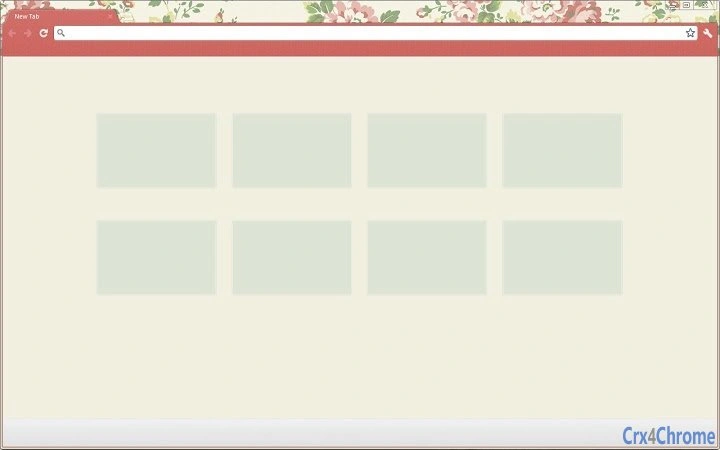
The primary purpose of this browser theme is to enhance the visual experience while promoting focus and simplicity. Designed with minimalistic principles, it streamlines the browser interface to highlight essential content, reducing distractions and improving user engagement. The theme caters to individuals seeking a cleaner, more comfortable browsing environment, particularly those who prioritize productivity and aesthetic harmony. Its vintage-inspired design adds a touch of timeless elegance without compromising usability. The developer, SlinkyMe, aims to deliver a tool that combines beauty with functionality, appealing to users who value both form and performance. Real-world usage scenarios include daily web browsing, content consumption, and work-related tasks where a distraction-free interface supports sustained concentration. The theme is intended for general users across Windows, Mac, and Linux platforms, making it accessible to a broad audience. It is not a full-featured application but a visual enhancement tool that complements existing browser functionality.
Key Features & Capabilities
- Minimalistic Design: Simplifies the browser interface by removing visual clutter, allowing users to focus on core content.
- Vintage Aesthetic: Incorporates nostalgic design elements that evoke a sense of calm and familiarity.
- Comfortable User Experience: Prioritizes readability and ease of navigation through thoughtful color schemes and layout adjustments.
- Focus-Driven Interface: Emphasizes key webpage elements, reducing distractions during browsing sessions.
- Universal Compatibility: Designed to work seamlessly across multiple operating systems, including Windows, Mac, and Linux.
These features are ideal for users who spend significant time online and seek a more pleasant, distraction-free environment. For example, writers, researchers, and remote workers can benefit from the reduced visual noise, enabling better concentration. The theme enhances the overall browsing experience by making the interface feel more intuitive and calming. It does not alter browser functionality but improves the visual layer, aligning with modern UX principles. The developer did not provide additional details about customization options or integration with third-party tools.
User Interface, Workflow & Performance
The user interface of this browser theme is centered around visual simplicity and intuitive design. It modifies the appearance of the browser’s toolbar, tabs, and background to create a cohesive, minimalistic look. Navigation remains unchanged, relying on standard browser controls, which ensures a smooth workflow for users of all skill levels. The theme does not introduce new menus or complex settings, maintaining a straightforward installation and activation process. Users can apply the theme with minimal effort, typically through a single click in the browser’s extension or theme manager. Performance is not significantly impacted, as the theme is a lightweight visual layer with no background processes. The developer did not specify resource usage details, but based on its file size and nature, it is expected to consume minimal CPU and RAM. Stability is assumed to be high, given the absence of complex logic or dependencies. No reported issues with crashes or conflicts were mentioned.
Compatibility & System Requirements
The software is compatible with Windows, Mac, and Linux operating systems, ensuring broad accessibility across desktop environments. It is designed to function as a browser theme, meaning it integrates with major web browsers that support theme customization. The version is listed as 1.0, indicating a stable release. The installation size is 2.3 MB, which is compact and suitable for quick deployment. The developer did not specify exact system requirements, such as minimum RAM, processor speed, or browser versions. Compatibility information was partially provided, and users are advised to ensure their browser supports theme installation. No additional hardware dependencies were mentioned. The theme is not tied to specific browser versions, but its performance may vary depending on the browser’s theme engine capabilities.
Pros and Cons
Pros
- Lightweight design with minimal system impact
- Enhances focus through a distraction-free interface
- Offers a unique vintage and minimalistic aesthetic
- Compatible with multiple operating systems
- Free to download and use
Cons
- Limited to visual customization—no functional enhancements
- No detailed system requirements provided
- Customization options may be minimal
- Dependent on browser support for theme installation
- Does not include advanced features like dark mode toggles or dynamic adjustments
FAQ Section
Is this theme compatible with my browser?
The theme is designed for browsers that support custom themes, such as Chrome, Firefox, and Edge. Users should verify that their browser allows theme installation before applying it.
Is the software safe to use?
As a browser theme, it does not execute code or access sensitive data. It only modifies the visual appearance of the browser interface. The developer, SlinkyMe, has not provided security certifications, but the theme is not known to pose risks.
How often are updates released?
Updates are not specified in the provided information. Users are advised to check the developer’s official channels for the latest version.
Can I use this theme offline?
Yes, once installed, the theme functions entirely offline. It does not require an internet connection to operate.
What license type does this software use?
The software is provided as free to use, with no restrictions mentioned. It is not open-source, and the license terms were not detailed in the available data.
Final Thoughts
This browser theme offers a refined visual experience tailored for users who value simplicity and focus. Its minimalistic and vintage-inspired design creates a calm, comfortable browsing environment that enhances user experience without altering functionality. While it does not provide advanced tools or features, its strength lies in its ability to improve concentration and aesthetic satisfaction. The cross-platform compatibility and lightweight nature make it accessible and efficient for a wide range of users. The free pricing model further increases its appeal. For individuals seeking a subtle yet impactful way to elevate their daily browsing, this theme delivers on its core promise. Download SlinkyMe’s sleek browser theme now.
Guides & Tutorials for Slinky Vintage Theme for Chrome
How to install Slinky Vintage Theme for Chrome
- Click the Preview / Download button above.
- Once redirected, accept the terms and click Install.
- Wait for the Slinky Vintage Theme for Chrome download to finish on your device.
How to use Slinky Vintage Theme for Chrome
This software is primarily used for its core features described above. Open the app after installation to explore its capabilities.
User Reviews for Slinky Vintage Theme for Chrome 0
No reviews found





